Skip to content

Conversation

@joshheald
Copy link
Contributor

@joshheald joshheald commented Dec 1, 2022

Description

In #8212, I removed the com.apple.developer.proximity-reader.payment.acceptance entitlement from the app, as I had mistakenly merged it to trunk in #8172, before the entitlement was added to our development provisioning profiles. This meant that people with the latest provisioning profiles would have been unable to build the app on their devices.

This PR adds the entitlement back to the app, for debug and release flavours. The entitlement is now added to our main App ID, and our development provisioning profiles, so it’s safe to add it back to trunk without breaking dev environments for people.

It's not added on the alpha entitlements, as our Enterprise App ID doesn't have the entitlement added by Apple. We're unsure whether they'll grant it on an Enterprise app, so that's being treated as a separate request.

No rush on this: I've put it in next week's milestone

Testing instructions

Using a build from Xcode, on a physical iPhone (the feature is not supported on iPad.)
You'll need to use an iPhone XS or newer, running iOS 15.4 or above.

  1. Navigate to Menu > Settings > Experimental features
  2. Turn on Tap to Pay on iPhone
  3. Navigate to Menu > Payments > Collect payment
  4. Go through the payment flow, and select Card on the payment method screen
  5. When asked for a reader type, tap Tap to Pay on iPhone and go through the Terms of Service Apple ID linking (if you've not done so before)
  6. Collect the payment by tapping a Stripe test card when prompted by the phone.

N.B. much of the flow is still under development, so it's not at all polished!


  • I have considered if this change warrants user-facing release notes and have added them to RELEASE-NOTES.txt if necessary.

This entitlement is now added to our development provisioning profiles, so it’s safe to add it back to trunk without breaking dev environments for people.
@joshheald joshheald added type: task An internally driven task. feature: mobile payments Related to mobile payments / card present payments / Woo Payments. labels Dec 1, 2022
@joshheald joshheald added this to the 11.5 milestone Dec 1, 2022
@wpmobilebot
Copy link
Collaborator

You can test the changes from this Pull Request by:
  • Clicking here or scanning the QR code below to access App Center
  • Then installing the build number pr8273-3c6569b on your iPhone

If you need access to App Center, please ask a maintainer to add you.

@joshheald joshheald marked this pull request as ready for review December 1, 2022 06:36
@joshheald joshheald modified the milestones: 11.5, 11.6 Dec 1, 2022
@lmischner
Copy link
Contributor

Hi! I took some time to review this PR and found some issues (let me know if you'd like them turned into individual GitHub issues or if you just want them here). I recognize that some of the things I may have found may not have been in scope yet, but would rather assume more is in scope than less so we don't miss things!

  1. "Order completed!" notification appears when transaction is cancelled.

Steps:

  • Menu > Payments > Collect Payment
  • Select Tap to Pay on iPhone
  • From the Apple screen, tap X to cancel.
  • If you go to the Orders screen, appropriately shows as "pending payment"
  1. The "Collect Payment" popup appears after I've paid via tap to pay, and if I'm quick enough, I can cancel the transaction at this point. This is different from using a bluetooth reader, where the user is immediately brought to the receipt popup. It just seems odd that I can do that.

  2. The Manage Card Reader screen has a couple of issues that I think are related. For unsupported devices, it never gets to the point of being able to add a bluetooth reader and for supported devices, I can't connect the bluetooth reader because it stays on the "Scanning for Reader" popup. In both cases, I think this is because we're first looking for the Tap to Pay "reader".

Steps:

  • Menu > Payments > Manage Card Reader
  • Tap Connect card reader
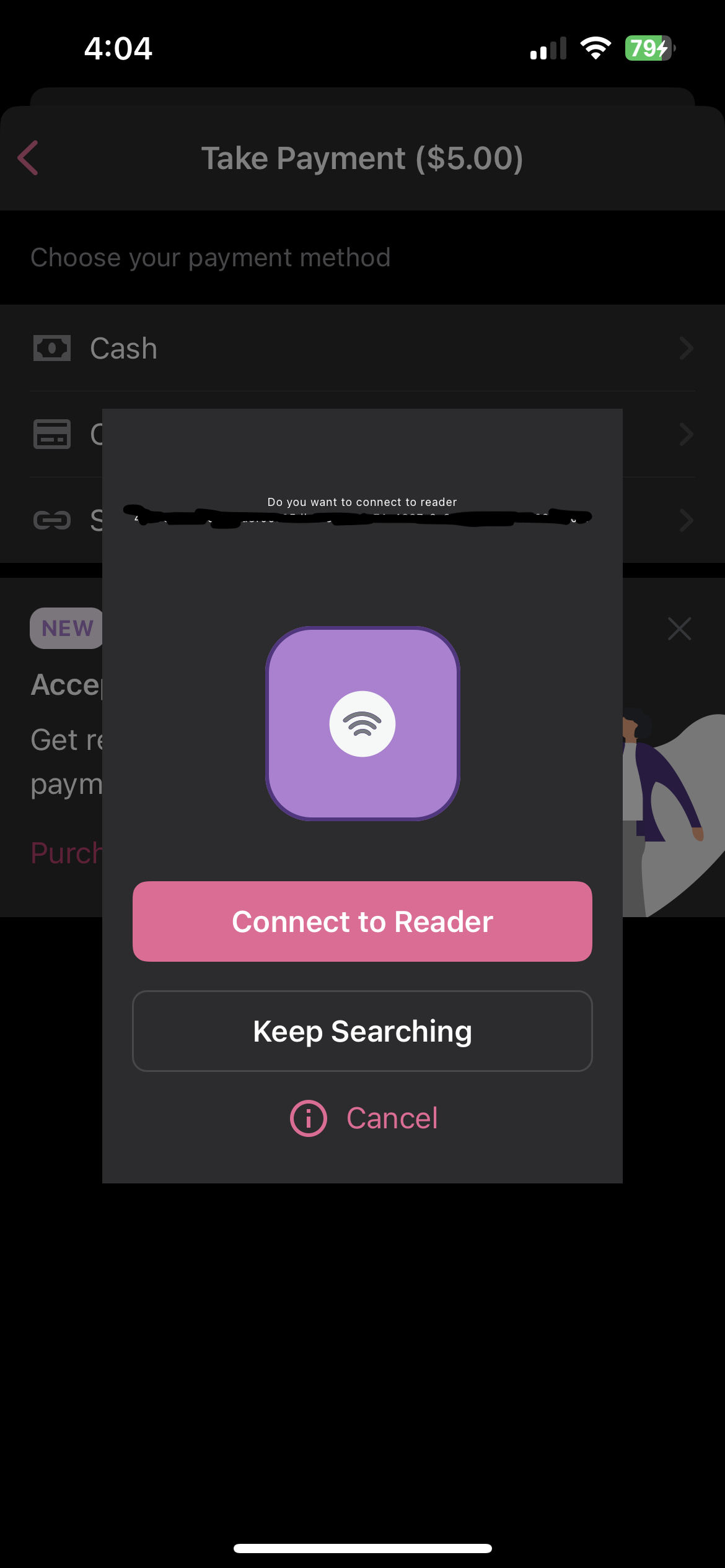
  • (Supported device) On prompt to connect to Tap to Pay reader, tap "Keep searching". At this point, it doesn't appear to find bluetooth reader.
  • (Unsupported device, like iPad) Note you keep on seeing the "connecting reader failed" message
  1. If Apple's tap to pay screen is open and I turn off the iPhone screen and turn it back on, I'm brought to an error about the payment failing. If I tap "Try Collecting Again", I get another error that I'm trying to use an unsupported feature and to try another reader.

  2. I have 2 different Woo accounts. If I use Tap to Pay in a store in one of those accounts, log out, and login to the other account, I can't set up Tap to Pay -- I just get stuck in a loop. I can even get myself into a situation where the cancel button doesn't work and I have to close the app to do anything. (In this video, I'm not tapping anything.)

RPReplay_Final1669922756.MP4

@jostnes
Copy link
Contributor

jostnes commented Dec 2, 2022

Adding a few more observations from early testing, some are UI issues:

  1. I'm not really sure what the numbers are but the iPhone as a reader has a really long name making the font really small:

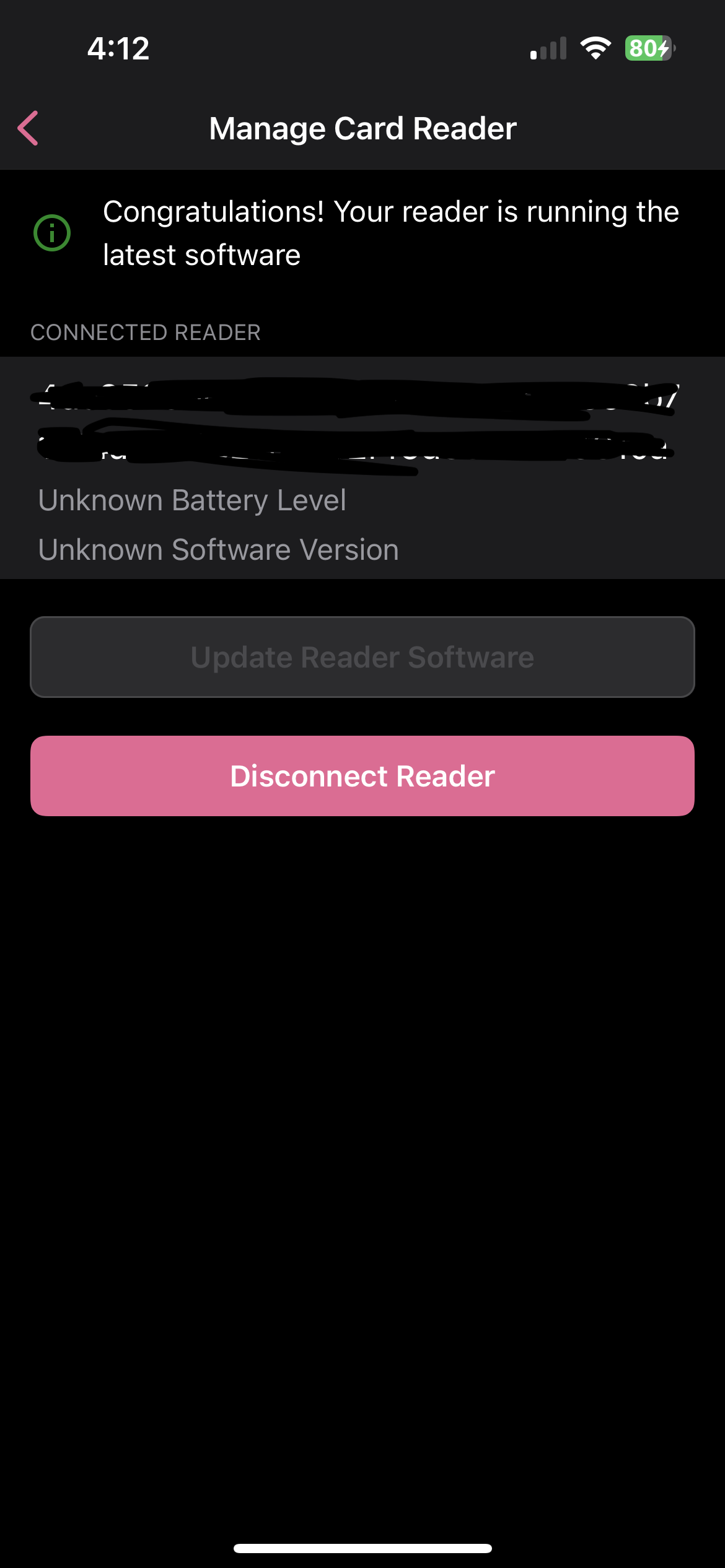
2. Battery level and software version are displayed as unknown:

3. When the app is already connected to a Bluetooth reader, the user won't see the tap to pay option after turning on the `Tap to Pay on iPhone` experimental feature

@joshheald
Copy link
Contributor Author

Thanks @lmischner! I appreciate your work here, it helps keep us all aligned and understanding of where the progress is at, so thanks for doing it and recognising that some of these things might just not be done yet.

  1. "Order completed!" notification appears when transaction is cancelled.

Steps:

  • Menu > Payments > Collect Payment
  • Select Tap to Pay on iPhone
  • From the Apple screen, tap X to cancel.
  • If you go to the Orders screen, appropriately shows as "pending payment"

Yep, I'm aware of this one. I was going to tackle it under #8089, but actually it's probably a different problem so I've raised #8288

  1. The "Collect Payment" popup appears after I've paid via tap to pay, and if I'm quick enough, I can cancel the transaction at this point. This is different from using a bluetooth reader, where the user is immediately brought to the receipt popup. It just seems odd that I can do that.

Agreed. There are issues with the bluetooth reader connection flow too which cause this, though they're more subtle and not as easy/likely to exploit, because you're switching from one device to another.

In particular, the same issue as you raise here: we continue to show "Collect Payment" long after the Stripe SDK has collected the payment details, right up until we send the authorised payment to WCPay servers. I've got some ideas on why that is and how we can fix it, but hadn't logged them anywhere. Added #8289

  1. The Manage Card Reader screen has a couple of issues that I think are related. For unsupported devices, it never gets to the point of being able to add a bluetooth reader and for supported devices, I can't connect the bluetooth reader because it stays on the "Scanning for Reader" popup. In both cases, I think this is because we're first looking for the Tap to Pay "reader".

This looks like a mistake on my part. The intention is that the Manage Card Reader screen should not attempt to discover to a built in reader (because there's nothing to manage), but should show when one is already connected (so that it can be disconnected and a bluetooth reader connected instead.)

I can see that it's doing a search for the connected card reader when the feature flag is enabled, which is wrong. I'll sort that on the latest PR in this stack today. Thanks!

  1. If Apple's tap to pay screen is open and I turn off the iPhone screen and turn it back on, I'm brought to an error about the payment failing. If I tap "Try Collecting Again", I get another error that I'm trying to use an unsupported feature and to try another reader.

This will be covered under #8089

  1. I have 2 different Woo accounts. If I use Tap to Pay in a store in one of those accounts, log out, and login to the other account, I can't set up Tap to Pay -- I just get stuck in a loop. I can even get myself into a situation where the cancel button doesn't work and I have to close the app to do anything. (In this video, I'm not tapping anything.)

RPReplay_Final1669922756.MP4

Nice catch! It only seems to happen when the second store isn't set-up for Tap on iPhone, it lets me take a payment if I try and repro it using two stores which I've been through the set-up flow for already.

My first instinct was that we'd need to disconnect the reader when the store changes... but I was surprised that's not already handled for bluetooth readers. It looks like it is handled, as we're not connected to the built-in reader when we go to the set-up flow for the second reader.

I checked what happens when I disconnect the built-in reader in Manage card readers before switching stores, and the issue still shows up then.

It looks like a tricky one, and it may even be something in the Stripe SDK. This may take some investigating time so I'll log it and maybe look at it next week. I don't want to get distracted by an edge case this early, but it's really good to know about it.

Logged #8290

@joshheald
Copy link
Contributor Author

Thanks for the review @jostnes!

  1. I'm not really sure what the numbers are but the iPhone as a reader has a really long name making the font really small:

This screen is removed from the connection flow in the latest PR: we auto connect to the built-in reader in that flow, so no need to show this one any more.

  1. Battery level and software version are displayed as unknown:

These are covered by #8081

  1. When the app is already connected to a Bluetooth reader, the user won't see the tap to pay option after turning on the Tap to Pay on iPhone experimental feature

This is expected: the flag controls the reader that they're connecting to, but we don't connect to a reader if there's already one connected. Using the Manage card readers option in settings to disconnect the bluetooth reader is required to change to using the built-in reader.

@joshheald
Copy link
Contributor Author

  1. The Manage Card Reader screen has a couple of issues that I think are related. For unsupported devices, it never gets to the point of being able to add a bluetooth reader and for supported devices, I can't connect the bluetooth reader because it stays on the "Scanning for Reader" popup. In both cases, I think this is because we're first looking for the Tap to Pay "reader".

This looks like a mistake on my part. The intention is that the Manage Card Reader screen should not attempt to discover to a built in reader (because there's nothing to manage), but should show when one is already connected (so that it can be disconnected and a bluetooth reader connected instead.)

I can see that it's doing a search for the connected card reader when the feature flag is enabled, which is wrong. I'll sort that on the latest PR in this stack today. Thanks!

This is fixed in #8281 now.

@toupper
Copy link
Contributor

toupper commented Dec 2, 2022

Thanks for the PR @joshheald ! It looks great. As discussed, I retrieved a couple of unhandled errors, that should be tackled in this issue. Apart from that, all good. :shipit:

@joshheald joshheald merged commit 5ab7104 into trunk Dec 5, 2022
@joshheald joshheald deleted the task/restore-tap-on-mobile-entitlement branch December 5, 2022 09:43
Sign up for free to join this conversation on GitHub. Already have an account? Sign in to comment

Labels

feature: mobile payments Related to mobile payments / card present payments / Woo Payments. type: task An internally driven task.

Projects

None yet

Development

Successfully merging this pull request may close these issues.

6 participants